AI color analysis: what software can and can't read
AI color analysis reads your skin, hair and eyes from a photo and names a season. It can measure pixels very well. It can't measure your skin, because the light and the camera sit in between, and that's why two tools, or two selfies, can give two answers.
- Hex
- #A07E56
- Lightness
- medium
- Turn on the color wheel
- 73.8°
- Warmth
- 27.5
- Shift from true
- almost identical
- Hex
- #B47E48
- Lightness
- medium
- Turn on the color wheel
- 67.8°
- Warmth
- 40.2
- Shift from true
- some way off
- Hex
- #927E5F
- Lightness
- medium
- Turn on the color wheel
- 81.2°
- Warmth
- 19.0
- Shift from true
- close
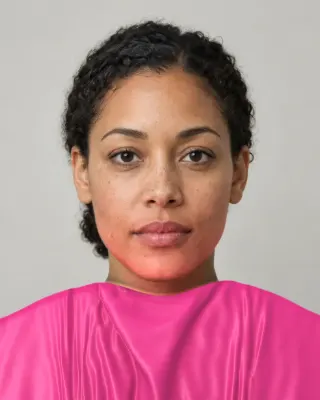
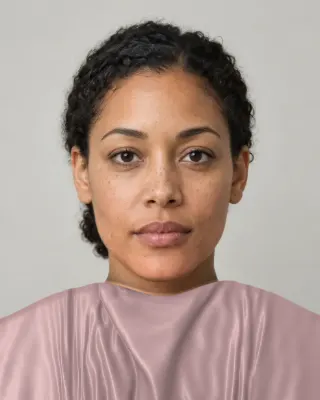
The picture at the top of this page isn’t a photograph. It’s one skin color, Monk tone 6, put through the same channel errors that our lighting test uses for a camera with a bad white balance. Every number was computed when this page was built. Keep it in mind for what follows.
How does the software work?
Under the marketing, tools take one of two routes, or mix them.
- A trained classifier. You feed a neural network many faces labeled with seasons, and it learns to guess the label from a new face. Its weakness is the labels. In the research dataset Deep Armocromia, students learned the system from expert examples, then labeled images of celebrities with known classifications, and those were used to label more. The model can’t be better than that chain, and celebrity photos are heavily lit and edited.
- Measure, then apply rules. Find the face, sample skin, hair and eyes, convert to a color space, and compare the numbers with each season’s definition. You can see each step and check it, which we like. But the rules are only as good as the tradition behind them, and the sampled numbers still came through a camera.
- A general chatbot. You upload a photo and ask. It’s a language model reasoning about an image, with no calibrated reading behind it. ChatGPT color analysis gets its own page.
Why does lighting matter so much?
A camera doesn’t record the color of your skin. It records the light that reached the lens after bouncing off your skin, then applies its own guess about what white should be, and then often sharpens and smooths the result. That guess is white balance, and it’s the main reason a reading drifts. Your own eyes do something similar, called color constancy, which is why you don’t notice the same drift in a room.
Look at the numbers at the top of the page. The same skin turns 13.4 degrees around the color wheel between a too-warm and a too-cool camera. For scale, one published skin survey found the averages of four whole groups of people within 7 degrees of each other. So a plain white balance error can move a reading about 1.9 times as far as the difference between those group averages. That’s the whole problem in one comparison. The signal an app is trying to read is smaller than the noise it arrives in.
Howard and colleagues found the same thing from another direction: image-based skin estimates for one person varied significantly from picture to picture. Dressika’s developer says it plainly in an App Store reply: different results from different photos are “absolutely normal”, because a photo can be warm or cool depending on camera and light.
A white reference helps, because it gives the software something known in the same light. With white paper in the frame, a tool can work out how far the camera is off and correct every other reading. It isn’t a cure. Paper isn’t perfectly white, it may not get the same light as your face, and some lamps have gaps in their spectrum that no correction can restore. But it’s the difference between a measured correction and a guess.
Is AI color analysis accurate?
We could find no independent test, so here is what’s on the record as of November 4, 2026, with what each number can and can’t tell you.
| Who | Figure | What it means |
|---|---|---|
| Dressika listing | up to 97% | A vendor claim, “based on validation from color consultants”. We found no published method. |
| Deep Armocromia, research | 55.4% | Best model on four seasons, about 5,000 face images. It had the right season in its top two 80.8% of the time. Guessing would get 25% and 50%. |
| Lumina, research | 55.6% | Color features from skin, hair and eyes on the same dataset. Spring was a systematic failure. Eye and hair said more than skin. |
| Kettlewell, a retailer | about 50% | Its own estimate of getting the broad season right, from one test person. It sells in-person sessions. |
| Cha, Bang and Kim, humans | 64.5 to 83% | How often four national drape systems agreed with each other. It hints at a ceiling, since people disagree too. |
These figures measure different things on different people, so please don’t rank them. They do tell you something, though. Researchers trying hard, with their labels in hand, reach just over half on four categories. Twelve is harder. So when a claim of very high accuracy comes with no method, it’s reasonable to ask what it was measured against. An accuracy figure needs a true answer, and for a season nobody has one. Our evidence page goes into that.
What we do, step by step
We don’t have a magic model. Our free scan is on-device landmark detection and ordinary color math, finished by your own eyes. No AI judges your face. Here’s the path, read from the code, with what can go wrong at each step. Our methodology page lists the steps and formulas.
There’s a second model on the site. The try-ons use MediaPipe’s multiclass selfie segmenter, which marks hair, face skin, body skin and clothes so that color lands in the right place, and the scan falls back on it when it can’t place your hair. That’s still on your device, and it doesn’t judge anything.
The paid report is where AI comes in, and we want to be exact about that. The Full Color Report ($19) uses AI image models to show you in your best and worst colors. That step uses a server model, once you’ve chosen to buy. So: free tier, on-device machine learning and math. Paid report, AI images. If you only want a season, you never reach the second part.
Is AI color analysis free?
Some is. Ours gives a season, a runner-up and six colors for free, and the apps page shows what others charge once you’re past the download. Be careful with “free” when a result is locked behind a trial that renews. Our free analysis page covers it in detail.
Which is best?
We haven’t tested them head to head, and we didn’t find anyone neutral who has. So instead of a ranking, here’s what we’d look for. Prefer a tool that names a runner-up over one that gives a single flat answer, and one that says what it couldn’t read. Prefer anything that lets you compare colors on your face, since even a retailer that sells in-person sessions found those were the most useful tools it tried. And treat a precise-looking number with suspicion. House of Colour, which also sells sessions, says colors “simply don’t appear the same on camera” as in real life, and on that much we agree.
Is it safe to upload a selfie?
That depends on the tool, and only its privacy policy can answer it. Look for three things: whether your photo is stored and for how long, whether it’s used to train anything, and whether you can have it deleted. A clear, frontal, makeup-free photo of your face is a fairly sensitive thing to hand over, so it’s worth a minute. Our own practices are on the privacy page.
How to get a better reading from any tool
- Face a window, out of direct sun, with no colored walls right next to you.
- Turn off beauty filters and warm screen modes. Portrait modes can also smooth away what’s being read.
- Take off makeup and pull back dyed hair, or at least tell the tool.
- Put something white in the frame. A sheet of printer paper gives any human or software a reference.
- Run it twice, in two different lights. Believe what stays the same.
- Finish with cloth. Two tops by a window will test the result better than a third app.
Related guides and tools
Sources
- Face Landmarker guide
- Image Segmenter guide
- Color balance
- Color constancy
- Measuring human skin colour. Wang M, Xiao K, Wuerger S, Cheung V, Luo MR
- Reliability and validity of image-based and self-reported skin phenotype metrics. Howard JJ et al.
- Deep Armocromia: a novel dataset for face seasonal color analysis and classification. Stacchio L, Paolanti M, Spigarelli F, Frontoni E (project poster)
- Lumina: seasonal color analysis system with explainable machine learning. Ou NYP, Chan JH
- Comparative analysis of diagnostic results of domestic and foreign personal color systems: UK, Japanese, Korean, German. Cha HY, Bang HJ, Kim JH
- Color Analysis: Dressika
- Does AI colour analysis work? We tested three of the most popular AI colour analysis apps
- Is AI color analysis accurate? Why in-person consultations matter
The Full Color Report: $19one time
You in your best and worst colors, about 40 colors with hex codes, makeup, hair and a capsule wardrobe plan.
See a sample reportCommon questions
- Why does AI give me a different color season each time?
- Usually because the photos differ, and a small change in light or white balance can move your reading across a season's boundary. Some tools also use models that can answer differently on repeat runs. Both are reasons to treat one result as a first estimate.
- Does lighting really change the result that much?
- It can. In our simulation, one skin color moves 13.4 degrees in hue between a too-warm and a too-cool camera, more than the gap between group averages in a published skin survey. Daylight and a white reference shrink the error without removing it.
- Is on-device analysis less accurate than cloud AI?
- Not by default. A cloud model may be larger, but both read the same camera image, and that's where most of the error comes in. What matters more is whether the tool corrects for light and tells you what it couldn't read.
- Can AI detect my undertone from a photo?
- It can estimate your skin's hue in that photo. Undertone is a convention, and it's hard to separate from light, a tan or a flush in one image. A white reference and several photos make it more trustworthy, and fabric comparison is still a good check.
- Can AI generate images of me in my colors?
- Yes, some tools do this, and our paid report includes it. These images are illustrations. They can show what a color might look like, but an AI image can also change your skin slightly, so they aren't evidence for or against a color. Use real fabric for that.
- Does AI color analysis work with glasses or colored contacts?
- Lenses can change what's read from your eyes, and glare can hide them. Take off colored contacts and tinted glasses if you can. Our scan drops an eye reading it can't trust, and leans on the other evidence.

See which colors are yours.
See your colors on your own face, compare seasons side by side, and get your season, your undertone and a starter palette.